Kitchen design apps range from simple drag-and-drop planners to professional rendering software — and picking the wrong one can waste hours. Some are built for browsing inspiration. Others handle precise measurements and 3D walkthroughs. A few give you actual pricing as you design.
The right choice depends on where you are in the process: casually exploring layouts, seriously measuring your space, or ready to price real cabinets. Here's how the best options compare in 2026.
At a glance: kitchen design apps compared
| App | Best For | Price | 3D | Real Pricing | Platform |
|---|---|---|---|---|---|
| IKEA Kitchen Planner | Browsing IKEA products | Free | Yes | IKEA only | Web, IKEA app |
| Planner 5D | Quick mobile visualization | Free tier | Yes | No | Mobile, web, desktop |
| Sweet Home 3D | DIY floor planning | Free (open source) | Yes | No | Desktop, web |
| SketchUp for Web | Detailed 3D modeling | Free tier; Pro $399/yr | Yes | No | Web |
| Homestyler | Realistic room rendering | Free tier; paid to $478/yr | Yes | No | Web |
| Cedreo | Professionals and remodelers | Free (1 project); Pro $119/mo | Yes | No | Web |
| DodiHome | Custom cabinets with real pricing | Free | Yes | Yes — actual custom pricing | Web |
One pattern stands out: most kitchen design apps help you visualize a layout, but almost none tell you what it will actually cost. The apps that do include pricing — like IKEA's planner — limit you to their own product catalog. If you're planning a custom kitchen, you'll typically design in one tool and get a quote somewhere else entirely.
Free tools for quick visualization
These apps are a good starting point if you're exploring layouts and want to see your space in 3D before committing to anything.
IKEA Kitchen Planner
IKEA overhauled its kitchen planner in 2025 with a new 3D experience now available in 17+ countries. You start by selecting a kitchen layout and configuration, then drag IKEA cabinets, appliances, and fixtures into your space. Pricing updates in real time as you add items — useful if you're comparing IKEA options specifically.
The limitation is scope. Everything in the planner comes from the IKEA catalog, which means pre-set cabinet dimensions and standard sizing. You can't enter custom measurements or mix in products from other manufacturers. For IKEA buyers, it's the best way to plan and price a kitchen before visiting a store. For anyone considering custom cabinetry, it's more useful as a layout brainstorming tool than a final planning step.
Price: Free
Best for: Homeowners planning an IKEA kitchen purchase
Limitation: IKEA products only — no custom dimensions
Planner 5D
Planner 5D has grown into one of the more popular general-purpose home design apps, particularly on mobile. It lets you switch between 2D floor plan and 3D views with a single tap, and its augmented reality features let you place virtual furniture in your actual room using your phone's camera. The free tier includes a library of 3,000+ items.
The trade-off is depth. Planner 5D covers the entire home — bedrooms, bathrooms, outdoor spaces — so it's not optimized for kitchen-specific decisions like cabinet configurations, appliance clearances, or work triangle flow. It's better suited for getting a rough sense of layout and style than for detailed kitchen planning.
Price: Free tier; paid plans available
Best for: Quick mobile visualization and AR walkthroughs
Limitation: General home design tool, not kitchen-specific
Sweet Home 3D
Sweet Home 3D is a free, open-source floor planning tool available in 25 languages. You draw your room layout, drop in furniture, and see an instant 3D rendering alongside the 2D plan. It's lightweight, straightforward, and doesn't require an account or subscription.
The furniture and material libraries are limited compared to commercial tools, and the 3D rendering quality is basic. But for DIY floor planning — getting a sense of where cabinets, appliances, and a kitchen island might fit — it's a solid no-cost option with no strings attached.
Price: Free, open source
Best for: Basic room layout and space planning
Limitation: Limited furniture library, basic rendering
For serious layout planning
If you're past the browsing stage and need more precision — detailed measurements, better rendering, or the ability to test multiple design iterations — these tools offer more control.
SketchUp for Web
SketchUp is a full 3D modeling platform, not just a kitchen planner. The free web version gives you access to the core modeling tools, a library of community-uploaded 3D models (including kitchen components), and 10 GB of cloud storage. Paid tiers ($129–$399/year) add desktop applications, professional documentation tools, and DWG file support for working with contractors.
The learning curve is real. SketchUp rewards patience — once you understand the modeling logic, you can create highly precise layouts that go well beyond what drag-and-drop planners offer. But it can take several hours of practice before you're productive. If you enjoy 3D modeling and want full control over every dimension, it's a powerful choice. If you want to see a layout in 15 minutes, look elsewhere.
Price: Free (web, personal use); Go $129/yr; Pro $399/yr
Best for: Detail-oriented users who want full modeling control
Limitation: Steep learning curve, not kitchen-specific
Homestyler
Homestyler offers 3D rendering for any room, with a large catalog of furnishings and materials you can swap in and out. The free tier lets you create and save projects with basic rendering; paid plans ($238–$478/year) unlock higher-quality output and more design assets.
Like Planner 5D, it's a whole-home tool — not purpose-built for kitchens. The interface can feel cluttered at first, and rendering quality in the free tier is noticeably lower than the paid versions. But if you're designing a kitchen that connects to a living or dining space, Homestyler's room-level rendering can help you visualize the full picture.
Price: Free basic; paid plans $238–$478/yr
Best for: Whole-room 3D rendering across connected spaces
Limitation: General-purpose, can be complex to navigate
Professional-grade: Cedreo
Cedreo is built for home builders, remodelers, and interior designers — professionals who need to produce photo-realistic renderings that help close client deals. The platform generates 3D floor plans and high-quality renderings in about five minutes, with a library of 7,000+ customizable furnishings. You can import existing blueprints in PDF, DWG, or image formats and collaborate with team members on projects.
The free tier is limited to one project and 20 renderings. The Pro plan runs $119/month — a meaningful investment, but one that professional remodelers can justify if they're producing client presentations regularly. For homeowners planning a single kitchen renovation, the cost-to-use ratio is harder to justify.
Price: Free (1 project, 20 renderings); Pro $119/mo
Best for: Professional designers and remodelers
Limitation: Pricing reflects a professional tool, not a consumer one
DodiHome: custom cabinet design with real-time pricing
Most kitchen design apps stop at visualization. You design a layout, then start a separate process to figure out what it costs — requesting quotes, scheduling consultations, waiting days or weeks for numbers. DodiHome works differently.
DodiHome's design app guides you through a series of questions about your kitchen — dimensions, layout type, appliance locations — then generates a 3D rendering of your space with actual custom cabinets placed in the layout. As you change materials, finishes, and dimensions, pricing updates in real time. Not estimates based on generic cabinet sizes — actual pricing for dimensionally custom cabinetry built at DodiHome's factory in Milpitas, California.
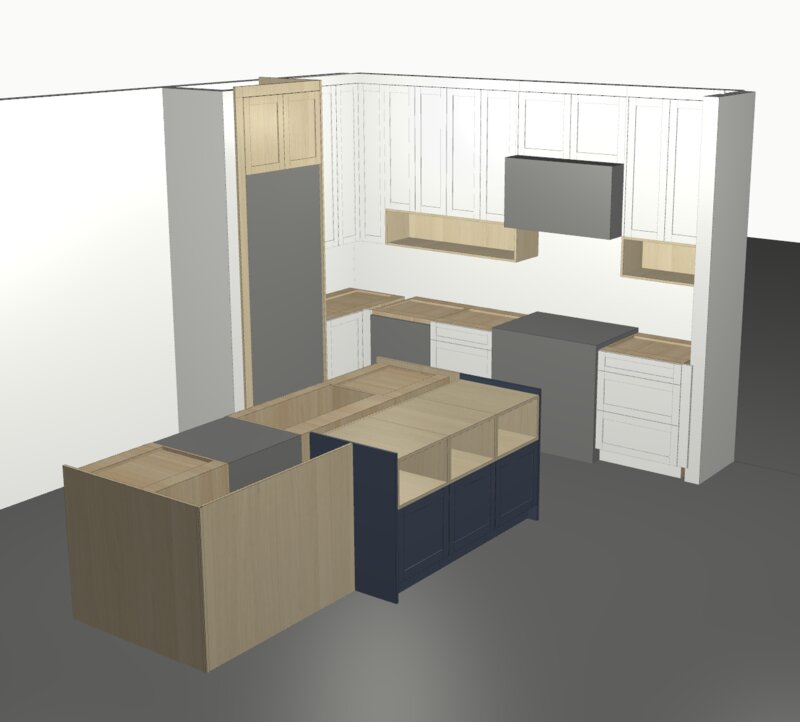
The app is free to use and runs in any modern web browser. It's the only tool in this roundup that connects design directly to manufacturing — the cabinets you see in the app are the cabinets that get built. Currently available for homeowners in the San Francisco Bay Area.
Price: Free
Best for: Bay Area homeowners designing custom cabinets with real pricing
What makes it different: Real-time pricing on actual custom cabinets, not estimates on stock sizes
How to choose the right kitchen design app
The right app depends on where you are in the process. Here's a simple framework:
If you're just exploring ideas — start with IKEA Kitchen Planner or Planner 5D. Both are free, require no learning curve, and let you experiment with layouts in a few minutes. You're not committing to anything; you're getting a feel for what's possible.
If you're measuring your space and testing layouts — Sweet Home 3D or Homestyler give you more flexibility to work with your actual room dimensions. If you're comfortable with 3D modeling, SketchUp offers the most control. These tools help you go from "I like the idea of an island" to "an island this size fits here, with this much clearance."
If you're a professional producing client presentations — Cedreo is built for you. The photo-realistic rendering and collaboration features are designed for closing deals, not browsing inspiration.
If you're ready to design and price real custom cabinets — DodiHome's design app is the only tool in this list that gives you actual pricing as you design. You'll see what your kitchen costs as you build it — materials, dimensions, finishes — without scheduling a consultation or requesting a quote. When you're ready, DodiHome's team handles the handoff from design to manufacturing. See how pricing works for more detail.
One more thing worth noting: these tools aren't mutually exclusive. Plenty of homeowners start with IKEA's planner or Planner 5D to explore rough layouts, then move to a more specific tool when they're ready to get serious about materials and pricing.